
Insights Blog
What is NetSuite Planning and Budgeting (NSPB)?
A Comprehensive Guide
Author: Dan Aldridge — PCG Director of Solutions Marketing
Executive Summary —
What is NetSuite Planning and Budgeting?
NetSuite Planning and Budgeting (NSPB) is a cloud-based Enterprise Performance Management (EPM) solution built on Oracle’s EPM engine. It natively integrates with NetSuite ERP to automate financial forecasting, driver-based scenario modeling, and collaborative departmental budgeting, replacing overblown and error-prone spreadsheets with a single, real-time platform.
History of Oracle and Hyperion
Back in the ’90s, well before Oracle purchased NetSuite, there was an EPM solution called Hyperion Enterprise. This was probably the best ad hoc and financial reporting package on the market back then. In fact, many ERP systems such as BaaN and Oracle EBS had an export, so Hyperion could be used for financial statements and budgets. Oracle recognized this trend, purchasing Hyperion in 2007. They then adapted it to the Oracle Cloud platform, creating what became the Oracle EPM offering.
History of NetSuite ERP
Founded in 1998 by Evan Goldberg with backing from Oracle’s Larry Ellison, NetSuite (originally NetLedger) pioneered cloud computing by delivering the first web-hosted accounting and business management software. It rebranded to NetSuite in 2003, held an IPO in 2007, and was acquired by Oracle for $9.3 billion in 2016.
NSPB Makes its Debut
NSPB was created under the NetSuite SuiteSuccess Planning and Budgeting Cloud Services (PBCS) initiative in 2018. The Oracle EPM engine was retrofitted to enhance NetSuite and rebranded as NSPB. It was officially unveiled at the SuiteWorld event of that year to provide pre-built, industry-specific planning and budgeting templates tightly integrated with the NetSuite ERP.
NSPB is meant to bridge the gap between the native NetSuite ERP accounting modules and enterprise-level financial planning and budgeting. Its origins stem from the need for advanced forecasting tools, combining NetSuite’s cloud financial and operational data with Oracle’s powerful EPM Cloud engine.
In this blog post, we will focus on the financial planning and budgeting aspects of NSPB, leaving the operational aspects for another day. Also, we’re planning several more articles about the implementation of NSPB and how it interacts with NetSuite ERP.
Highlights from “What is NetSuite Planning and Budgeting (NSPB)? A Comprehensive Guide
- Excel isn’t going away, but it’s hitting a ceiling as companies scale.
- There are ways to hold onto the Excel interface with NSPB’s Microsoft Office Smart View.
- Surveys indicate that 70% to 90% of organizations still rely on Microsoft Excel for budgeting, planning, and forecasting.
- NetSuite ERP has relatively good tools for Finance dashboards, financial statements, drill-down to transactions, and basic budgeting. It takes care of the actual results and can provide actual vs budget comparisons.
- NSPB adds many capabilities in flexible budgeting, sophisticated forecasting models, what-if scenarios, and so on that not even the fanciest spreadsheet models can touch.
- While it doesn’t completely replace spreadsheets, as some financial managers still want to use Office Smart View or export to Excel from financial statements, NSPB replaces the need for the massive multi-tab spreadsheets that Finance departments swear by today to run the business.
Why Excel Has Been the Default for So Long —
It’s no secret why Excel became the standard tool for Finance departments all over the world. It started in Windows in 1987 and immediately took over the market. In the early days of ERP systems, around this same time, financial reports were printed on paper directly from Financial Statements modules.
To avoid paper, CFOs ordered ERP custom reports to put the output directly into a spreadsheet. This made it easy for Finance departments to use because:
- The familiarity meant a low barrier to entry – everyone already knows it
- It has flexibility for custom formulas and one-off models
- It can be modified easily without restrictions on values or formulas, an advantage which ironically can be a disadvantage under certain conditions
- Once Excel became part of Microsoft Office, there was $0 incremental software cost
Excel is Still the Choice for the Majority of Companies —
Surveys indicate that 70% to 90% of organizations still rely on Microsoft Excel for budgeting, planning, and forecasting. While many of these companies have adopted specialized financial software, they typically still use Excel alongside those tools for data manipulation, modeling, and reporting. [Source: Barc.com – Budgeting Software vs Excel, Vena Solutions – Automated Budget Spreadsheet, etc.]
Where Traditional Excel Budgeting and Financial Statements Break Down —
Here’s an infographic showing how Excel breaks down when used for budgeting and financial planning purposes. Many of these pain points aren’t just for budgeting; they also limit financial statements, financial planning and forecasting, and financial analysis.
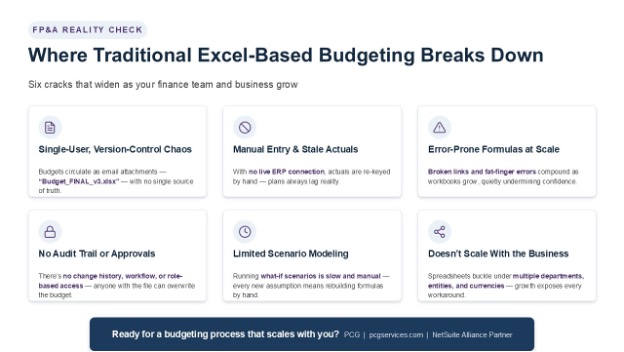
1. Single-user, version-control chaos: Typically, financial actuals and budget templates are circulated as email attachments that individual users must fill out for their departments, so there are many spreadsheet versions with no single source of truth. In a company that has departments in the hundreds, consolidation and versioning of budget spreadsheets can be a nightmare.
2. Manual data entry and stale actuals: With Excel-based budgets, there is no live connection to the live ERP system for actuals, and the budgets must be input manually. When there is a feed from ERP for actuals, it is almost immediately stale, and the budget numbers that change must be manually fed into a budget vs. actuals comparison. This cumbersome process is why many companies only update their actuals once a month and budgets as little as once a year.
3. Error-prone formulas at scale: A feature of Excel that gives CFOs and Controllers fits is that any user with access to the “final” spreadsheet model can change anything. That means there’s a high potential for link breaks, incorrect formulas, “fat-fingering” individual values, etc.
4. No audit trail, approval workflow, or role-based access: With a spreadsheet, there is no real audit trail of which values changed, when, and why. This can cause problems for auditors who want to see numbers coming out of the financial system (e.g., the ERP or EPM). In a spreadsheet, there is also no way to automate approval workflows or restrict access based on a role within a company.
5. Limited scenario modeling: Forecasting and scenario modeling are extremely limited in Excel. For example, to run a “what-if” forecast, changes often have to be made across multiple linked sheets, and time-consuming recalculations are required. This process is inefficient and potentially error-prone.
6. Doesn’t scale across departments, entities, or currencies: In a larger company, such as a manufacturer with $500M+ in revenue, the number of departments and dimensions for financial reporting (e.g., statements) can increase exponentially, and budgeting doesn’t scale well in Excel.
Also, there is no easy way to deal with rollups to legal entities or across countries. Multi-currency is virtually impossible to handle in Excel because financial transactions involve currency translations, and realized and unrealized gains/losses are booked throughout the month in multi-currency situations. Spreadsheets can’t keep up.
The Bottom Line
If you’re a CFO or Controller trying to decide whether “no decision, let’s stay on Excel” is the right decision, maybe these limitations of Excel-based financials will give you pause. For those who have NetSuite ERP, the actual financials should be handled there, as opposed to another system like QuickBooks, and the budgeting should be done in NSPB.
NetSuite Financials are Really Good to Start With. Except for Budgeting and Planning —
The video smartly covers the three key financial statements (Balance Sheet, Income Statement, and Cash Flow Statement), briefly explaining how they work together and how they operate in NetSuite. These videos are part of a series of excellent NetSuite courses, which you can access at: https://www.supertraining.cloud/
This video also gets into the interplay between the different financial statements, and how they should tie out to produce a good snapshot of the financial health of your company.
In NetSuite ERP, reports like the Income Statement can be filtered by departments, entities, business units, etc., depending on how the Chart of Accounts and the financial statement accounts are structured. And yes, they can be exported to Excel to compare to budgets if they are still being done the old-fashioned way – in spreadsheets.
The snapshot is always backward-facing (past), however. NetSuite ERP by itself is ill-equipped for scenario modeling, predictive analytics, or forecasting the future.
The Need for Advanced Planning —
As businesses outgrow static spreadsheets and native NetSuite budgets, they require stronger capabilities for rolling forecasts, “what-if” scenario modeling, and complex, driver-based planning. A static, fixed budget that didn’t flex wasn’t enough anymore for CFOs, especially in rapidly changing industries like automotive or aerospace and defense manufacturing.
NetSuite and its parent company, Oracle, sought to build a dedicated module that combined transactional accounting from NetSuite ERP with strategic financial budgeting. That module is NSPB!
What NSPB Adds to NetSuite ERP —
NSPB offers a variety of capabilities that extend NetSuite ERP financials. With NSPB connected to ERP, it becomes a real engine for financials at the click of a button within ERP, with a two-way transfer of actuals into NSPB and budgets within NSPB to produce budget-vs.- actual comparisons at any level.-actual comparisons at any level. At a high level, NSPB provides these enhancements to NetSuite ERP:
- Real-time sync with NetSuite ERP (e.g., GL, AR/AP, revenue, headcount)
- Driver-based, multidimensional planning models
- Built-in scenario planning (best/worst/baseline case) with instant recalculation
- Workflow, approvals, and version control baked in
- AI/ML layer: predictive forecasting, anomaly detection, auto-generated commentary
- Still lets users work in a familiar Excel-like interface via Smart View — so it’s not “goodbye Excel,” it’s “Excel connected to a single source of truth”
Full NSPB Capabilities and Benefits —
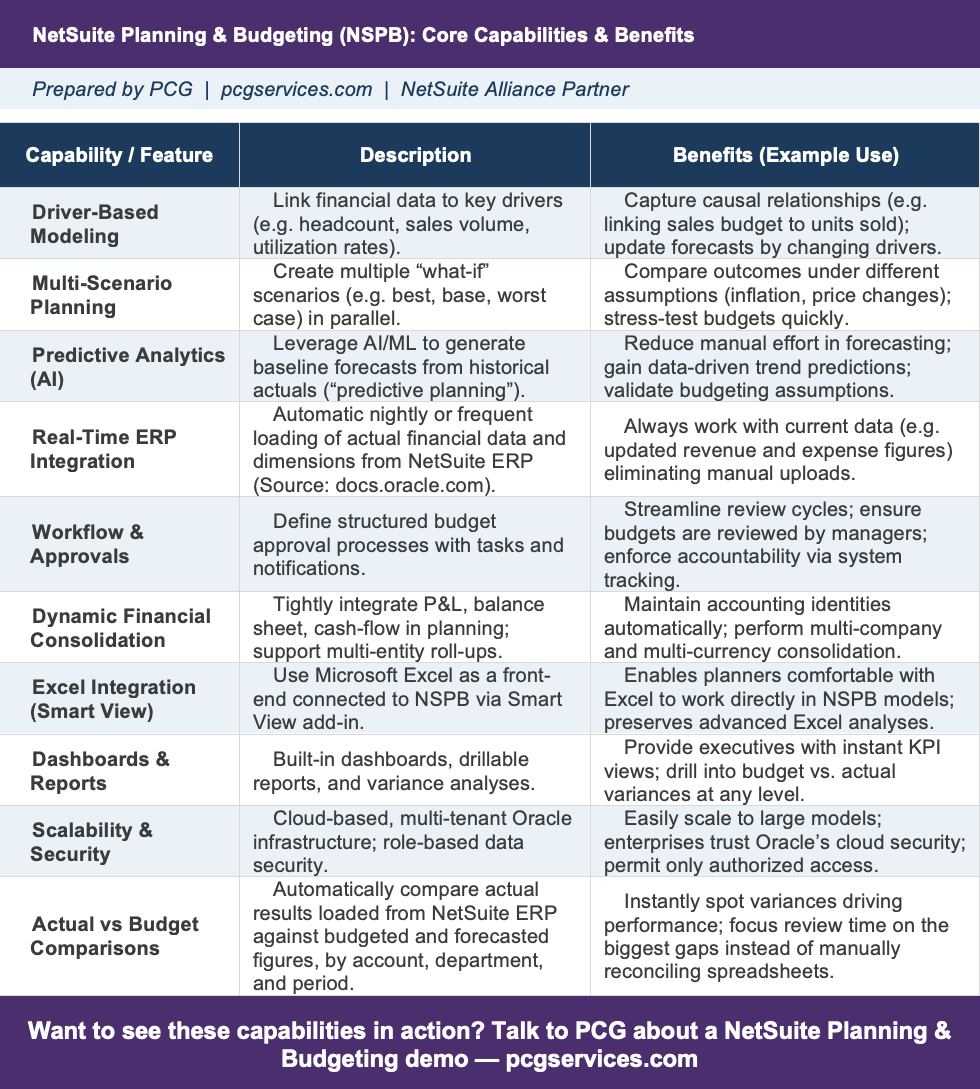
Here are the more detailed core capabilities and benefits, none of which are possible in NetSuite ERP alone – even combined with spreadsheets.
At PCG, our favorite capability is that Finance can do any kind of Actual vs Budget Comparison at any level (e.g., legal entity, business unit, department), at any time, in real time. This can be done in a “top down” (i.e., using high-level numbers and splitting based on percentages or drivers) or “bottom up” (i.e., rolling up from departmental level based on the hierarchy). Instead of tweaking multiple spreadsheets and reconciling numbers, a CFO or Controller can relax and let NSPB crunch the numbers.
Since we routinely work with multinational and multi-site companies, the Dynamic Financial Consolidation capability is huge. Because the profit & loss (P&L), balance sheet, and cash flow statements are modeled in NSPS planning, multi-entity roll-ups can be done at the touch of a button.
Driver-based Modeling and Multi-scenario Planning are capabilities that NetSuite ERP combined with spreadsheets doesn’t have. The ability to set up models with drivers such as headcount, sales units sold, and utilization rates that can be changed on the fly to change the model or plan.
In today’s turbulent environment where the inputs and desired outcomes are changing constantly, a static model or scenario testing in Excel cannot even begin to stay relevant!
Here is the full NetSuite Planning & Budgeting (NSPB) Core Capabilities and Benefits list.
A Detailed Demo of NSPB —
Seamless Integration with Microsoft Office —
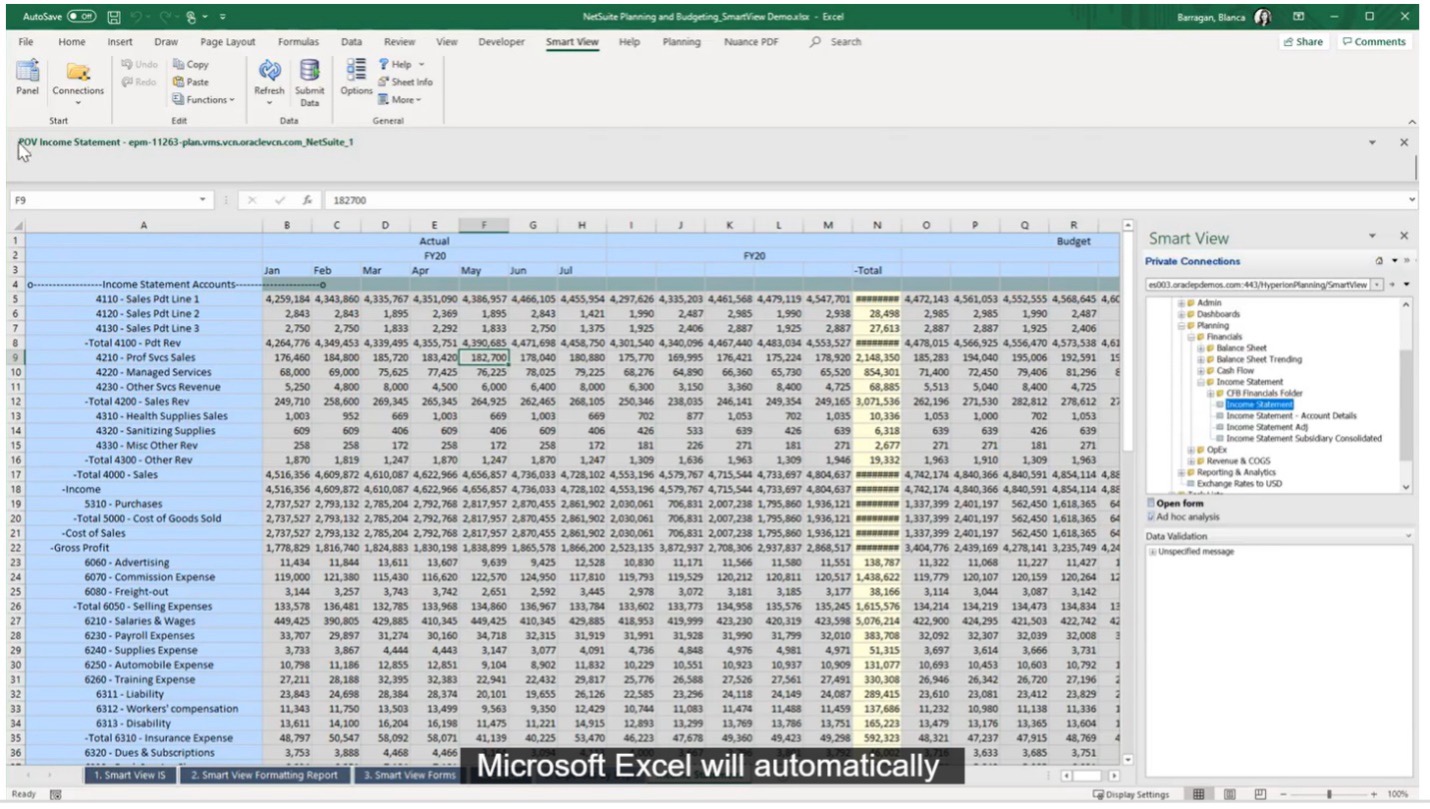
If all this change seems like too much and there’s resistance from the “We love Excel and don’t want to lose it” crowd, you can pump the brakes on your NSPB rollout by introducing Microsoft Office Smart View to the Finance team.
Both NetSuite ERP and NSPB integrate seamlessly with Microsoft Office tools, particularly Excel. This integration gives you the best of both worlds: the familiarity of Excel combined with NetSuite’s powerful data management and collaboration capabilities.
The Smart View feature is particularly impressive, allowing users to:
- Access NetSuite data directly from Excel, Word, and PowerPoint
- Create dynamic reports that update automatically when data changes
- Perform “what-if” analyses using familiar Excel functions
- Submit data changes back to NetSuite with full validation and security
Want to see it in action? Here’s a great video from our PCG Insights HUB on NSPB’s MS Office (Excel) Smart View. This is like an interim step if you don’t really want to get off spreadsheets… at least not just yet!
Click on the image below to view the video.
At PCG, we guide companies through NetSuite ERP implementations and NSPB, and many are reporting exceptional results when using NSPB for the budgeting, forecasting, and scenario planning aspects of their businesses. And having the Office (Excel) Smart View makes the transition from spreadsheet-based budgeting and makes NSPB even easier to master!
While spreadsheets are “free”, in the sense that Excel is part of Microsoft Office, there are many hidden costs such as time to create the spreadsheets in the first place, errors, complexity, decreased trust from auditors, people who maintained the spreadsheets leaving, and so on.
A much better and lower-cost path is to optimize and clean up the financials in NetSuite ERP, then invest in a proper planning solution like NSPB.
Key Insights from Forrester about NSPB —
What happens when you upgrade to NSPB? Leading analyst firm Forrester has studied NSPB and business intelligence, quantifying several of the benefits and outcomes you can achieve by implementing NSPB. These benefits of NSPB are from publicly available Forrester articles:
- Driving Faster Time-to-Benefit: A Forrester report notes that organizations actively managing ERP value and using these integrated tools experience 30%–40% faster time-to-benefit and up to 2.5x higher ROI than structured value management without such systems.
- Bridging the Data Gap: Research from Forrester’s independent Total Economic Impact (TEI) studies tied to the NetSuite ecosystem show significant returns (sometimes projecting up to 265% ROI) when migrating from disconnected spreadsheets to integrated data models.
- Enhancing Business Intelligence: Forrester analysts and associated industry observers note a growing demand for advanced forecasting and NetSuite Planning & Budgeting (NSPB) tools. These replace static, row-heavy spreadsheets with visually rich data and interactive reporting.
- Native Integration as the Core: Forrester research frequently highlights that using native, connected modules within a single platform—like NSPB connecting directly to NetSuite ERP—prevents fragmentation and streamlines the financial close and forecasting process.
Best Practices for Financial Planning with NSPB —
We will publish more articles on NSPB, including how to prepare for an NSPB implementation and the data elements flowing through the APIs between NSPB and NetSuite ERP. For now, though, here are several best practices from our experience:
- Get executive buy-in. Engage leadership on scenario design, key drivers, and reporting requirements. In order to measure the outcomes and ROI from upgrading to NSPB, it’s important to define KPI’s that the execs can monitor before and after the implementation.
- Use dashboards for visibility. Create role-based dashboards for executives and managers, focusing on KPIs, trends, and key variances. This includes the KPIs defined during the executive buy-in process.
- Start simple and iterate. Begin with core financials (P&L, basic headcount), then layer in CapEx, revenue models, and allocations.
- Train budget owners. Provide targeted training for department managers on templates, drivers, and workflow. If the users of the system aren’t engaged and confident in how to use it, they won’t use it and will revert back to spreadsheets.
- Automate data feeds. Schedule regular imports so actuals and master data are always current. This capability is enabled by the interface and APIs, so it can be set to almost real-time synchronization.
- Review monthly, not quarterly. With the virtually real-time data interface turned on, it’s easy to update monthly variances and forecasts to keep planning proactive.
How to Get Started —
- Schedule a readiness assessment of your current spreadsheet pain points.
- Talk to an implementation partner (we recommend PCG, of course) who has years of NetSuite ERP and NPSB experience, plus the domain knowledge in Finance to match.
Conclusion —
In conclusion, with today’s complexities and audit requirements, CFO’s can no longer rely on Excel alone for financial statements, budgeting, financial planning, and running scenarios. With AI coming in, what is needed in today’s financial departments is a proactive system that ties directly to the ERP data and is fully auditable out of the box.
Instead of taking weeks, even months, to close the books, NSPB allows closing in days or even hours with trackable results, accurate actuals vs. budget comparisons, and multiple budget scenarios (e.g., fixed, rolling) that are done right in the NSPB software.
Many companies are still drowning in oceans of spreadsheets, with many manual spreadsheets circulated as departmental budgets that must go into an even bigger “master” sheet. The master sheet is always one accidental deletion, formula change, or fat finger away from chaos.
Does this sound like your organization? If so, don’t worry. You’re among friends. Thousands of finance teams struggle with this all-too-common process. But if you have NetSuite ERP and you’re willing to add NSPB, it doesn’t have to be that way.
With NSPB connected to NetSuite ERP, that error-prone, time-consuming process goes away. It’s not that Excel itself will go away. Not at all. Simply put, NSPB eliminates the cumbersome, ungoverned spreadsheet-driven process and replaces it with AI-assisted planning that still feels like Excel. It’s a CFO and Controller’s dream!
Let’s Do This —
So, are you using Quickbooks + spreadsheets, or worse, spreadsheets only, and you’re thinking you can compete with companies that have financial planning & analysis software? Do you have NetSuite ERP without NSPB, and your CFO wants to move to the next level?
We’ve got many accountants on staff who work with NSPB and can attest to the relief from “spreadsheet hell” it brings. We feel your pain because we’ve experienced it!
PCG can help you with your NetSuite ERP and NSPB implementations, as we offer both. Here are our NetSuite Solutions page and our NetSuite Advisory page. We have also created a large library of NetSuite videos in our PCG Insights HUB, which includes NetSuite ERP Finance, NetSuite Next (the new UI), and NSPB videos.
You can reach us at pcgservices.com, at info@pcgservices, or via our Contact form here. We offer a one-hour-long NSPB readiness assessment for free. We are also available by phone at +1 (800) 265-1230.
Make sure to follow us on our active PCG LinkedIn page where you can find information about ERP, FP&A software, and tech trends.
Transform your financial planning operations with NetSuite Planning and Budgeting. Automate workflows, gain real-time insights, and empower your teams with actionable data.
We hope you liked our blog.
///
Dan Aldridge
Dan has 25+ years of corporate management experience including CEO, CFO and Controller of the consulting firm he founded and grew for 13 years. He has ERP software and digital transformation experience working with CEO’s, CFO’s, Controllers, and other C-levels at Fortune 500 companies. He specializes in Finance (e.g., Financial Statements, General Ledger, Accounts Payable, Cost Accounting) and Manufacturing (e.g., MRP, Production, Industry 4.0, Smart Factories, MES systems) consulting and project management.
Work together with PCG for great Infor platform success. Contact us, and let’s get started!
NOTE: All references to external content, motion pictures, actors, or third-party story lines does not represent an implied or explicit relationship with any third-party content owner. All trademarks, tradenames, movie titles, scripts and story lines, and NIL remain the property of their respective owners.
More Information for You





Solutions
Services
Support
Platforms
Technology Partnerships




Contact | Legal | Privacy Policy | LinkedIn | YouTube | SmartFactory | OrangeQuery | AskQ
